
Introduction
Sitecore Analytics is a powerful tool for user tracking, enabling personalization, device detection, and other analytics-driven features. At its core, Sitecore Analytics utilizes the SC_ANALYTICS_GLOBAL_COOKIE to track users and create contact profiles. However, automatic cookie creation poses a challenge in regions where GDPR compliance or similar data privacy regulations are mandatory, as it requires explicit user consent to store cookies.
In this blog, we’ll explore a solution for managing GDPR compliance by conditionally enabling the SC_ANALYTICS_GLOBAL_COOKIE only after obtaining user consent.
The Challenge
When Xdb.Tracking.Enabled is configured in Sitecore, user tracking processes begin through the StartAnalytics pipeline. A key processor in this pipeline, CreateTracker, is responsible for generating the SC_ANALYTICS_GLOBAL_COOKIE. However, to meet GDPR compliance standards, this cookie should only be created after receiving explicit user consent. Without intervention, the SC_ANALYTICS_GLOBAL_COOKIE will be automatically generated, risking a potential breach of privacy laws.
The Solution: Preventing Automatic Cookie Creation
To address this issue, we can inject a custom processor into the StartAnalytics pipeline, which checks for consent before creating the SC_ANALYTICS_GLOBAL_COOKIE. If a user has not consented, the pipeline will be aborted, ensuring the cookie is not generated.
Implementation Steps
Add a Custom Processor for Consent Check
Place a custom processor in the StartAnalytics pipeline before the CreateTracker processor to verify user consent.
Here’s an illustrative configuration:
<configuration xmlns:patch="http://www.sitecore.net/xmlconfig/">
  <sitecore>
    <pipelines>
      <startAnalytics>
        <processor
            type="BasicCompany.Foundation.Multisite.Pipelines.Analytics.CheckUserConsentCookie, BasicCompany.Foundation.Multisite"
            patch:before="processor[@type='Sitecore.Analytics.Pipelines.StartAnalytics.CreateTracker, Sitecore.Analytics']"
            resolve="true" />
      </startAnalytics>
    </pipelines>
  </sitecore>
</configuration>
Create the CheckUserConsentCookie Processor
- Abort the pipeline if the user has not provided consent.
- If the SC_ANALYTICS_GLOBAL_COOKIE already exists, remove it to maintain compliance.
using Sitecore.Pipelines;
using System;
using System.Web;

namespace BasicCompany.Foundation.Multisite.Pipelines.Analytics
{
    public class CheckUserConsentCookie
    {
        public void Process(PipelineArgs args)
        {
            if (!CheckCookieAccepted())
            {
                Sitecore.Analytics.Tracker.Enabled = false;
                args.AbortPipeline();
                DeleteAnalyticsCookie();
            }
        }

        private bool CheckCookieAccepted()
        {
            if (HttpContext.Current.Request.Cookies["CookieConsent"] != null)
            {
                var hasConsented = HttpContext.Current.Request.Cookies["CookieConsent"] != null && HttpContext.Current.Request.Cookies["CookieConsent"].Value == "true";
                return hasConsented;
            }
            return false;
        }

        private void DeleteAnalyticsCookie()
        {
            HttpCookie analyticsCookie = HttpContext.Current.Request.Cookies["SC_ANALYTICS_GLOBAL_COOKIE"];

            if (analyticsCookie != null && !string.IsNullOrEmpty(analyticsCookie.Value))
            {
                HttpContext.Current.Response.Cookies.Remove("SC_ANALYTICS_GLOBAL_COOKIE");
                analyticsCookie.Expires = DateTime.Now.AddDays(-10);
                analyticsCookie.Value = null;
                HttpContext.Current.Response.SetCookie(analyticsCookie);
            }
        }
    }
}
Validate Configuration Use the Showconfig.aspx tool :
(https://<domain>/sitecore/admin/showconfig.aspx) to confirm the custom processor is properly registered in the pipeline.
Sample output for startAnalytics pipeline in the configuration:

Testing
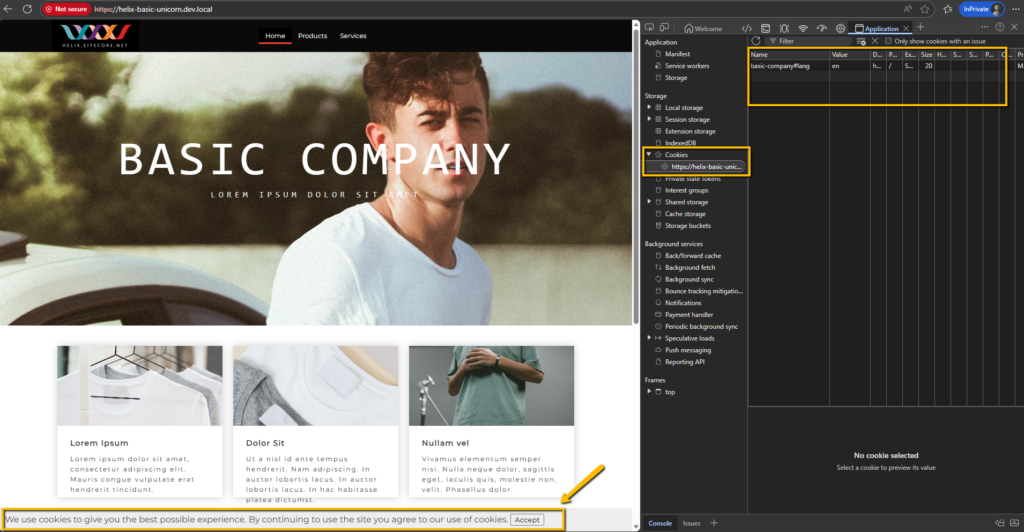
Scenario 1: User Does Not Grant Consent
- If a user declines cookie consent, the custom processor will block the subsequent creation of the SC_ANALYTICS_GLOBAL_COOKIE. This behavior can be verified in the browser developer tools under the Cookies section—no cookie should have been created.
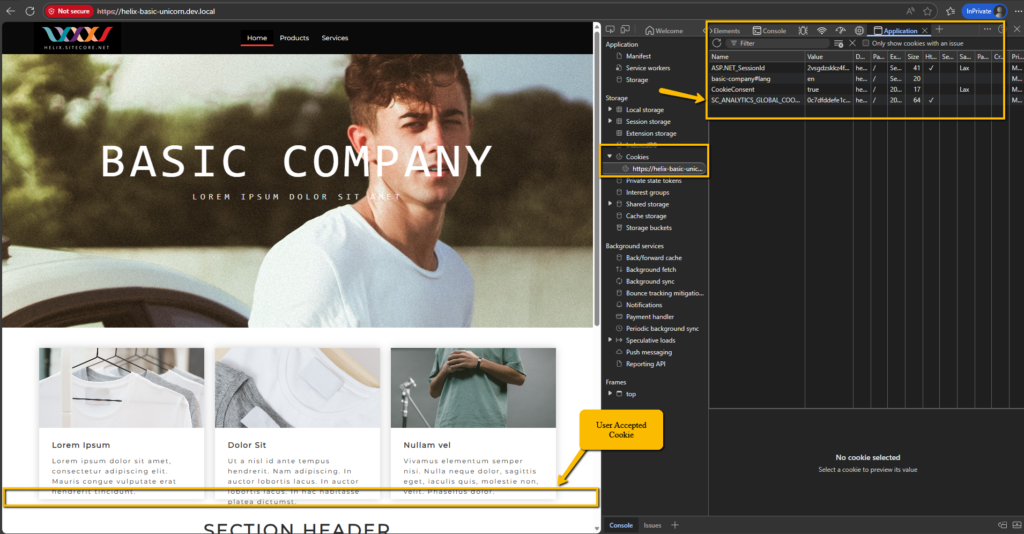
Scenario 2: User Grants Consent
- If a user accepts cookies, the custom processor will allow the CreateTracker processor to run, leading to the generation of the SC_ANALYTICS_GLOBAL_COOKIE. This can also be verified by inspecting the Cookies section of the browser.
Conclusion
By implementing a custom processor in the StartAnalytics pipeline, Sitecore developers can prevent the automatic creation of the SC_ANALYTICS_GLOBAL_COOKIE and ensure GDPR compliance by conditionally enabling user tracking based on consent. This approach demonstrates a commitment to protecting user privacy while maintaining the ability to leverage Sitecore’s analytics and personalization features responsibly. Adopting such solutions is a critical step toward building privacy-compliant and user-centric digital experiences.
Stay compliant, and create a strong foundation of trust with your users while unlocking the full potential of Sitecore Analytics.